They are not safe by default – at least not safe enough for a business that cares about data, IP, consent and compliance. You can make them safe‑ish, but only if you impose structure and clear rules.
Below is a consolidated guide combining all recent answers, tailored to your web design and digital marketing teams.
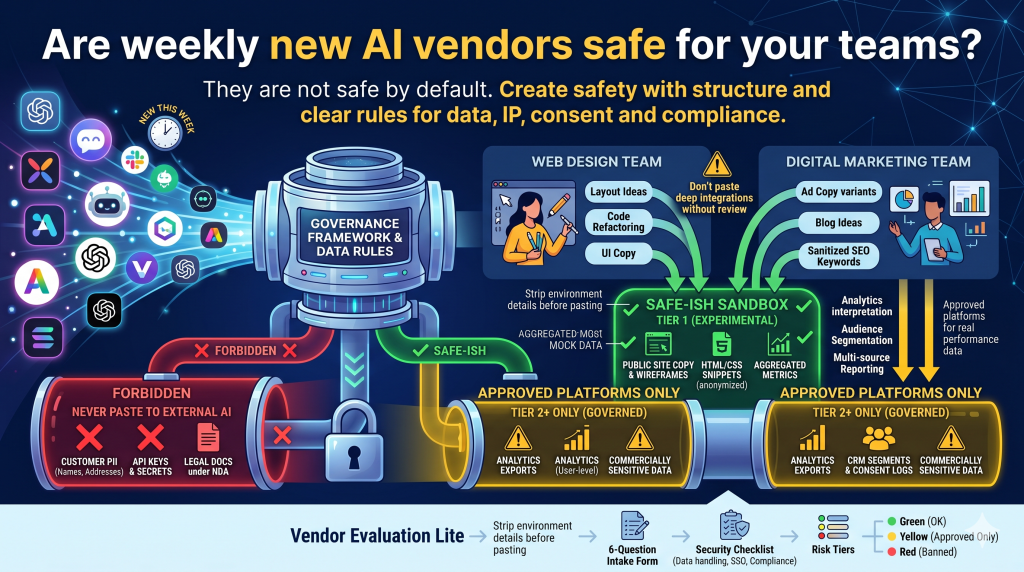
1. What “safe” should mean for you
Start with explicit boundaries. Before even evaluating vendors, define:
- Data you will never send to any external AI
- Data that is OK only in approved / governed platforms
- Data that is OK for low‑risk experiments
Turn this into a 1‑page “AI Data Use Policy” that your teams can understand in seconds.
1.1 Three data buckets
Forbidden to paste into any external AI:
- Customer PII (names, emails, phone numbers, physical addresses, order IDs tied to a person).
- Authentication or infra details (API keys, OAuth tokens, GTM/GA4 measurement IDs combined with secrets, DB connection strings, SSH keys).
- Legal docs under NDA, security architecture diagrams, unreleased pricing, contracts under negotiation.
Allowed only in approved / Tier 2+ tools (governed / enterprise):
- Raw analytics exports that include user‑level tracking IDs or cookies.
- CRM / CDP segments, consent logs, order feeds.
- Any dataset that could be mapped back to a real individual, even indirectly.
Safe for almost any AI (weekly “sandbox” tools):
- Public site copy, sitemaps, wireframes.
- HTML/CSS/JS snippets with all IDs, keys, and environment URLs removed.
- Anonymized or aggregated metrics (e.g. “conversion rate by channel, week over week”).
- Mock data and example payloads created purely for demonstration.
2. Minimum vendor safety checklist (applies every time someone wants a new AI tool)
Whenever someone proposes a new AI vendor, quickly assess:
2.1 Data handling & training
- Do they log customer prompts and outputs?
- Are prompts/outputs used to train or fine‑tune their or any third‑party models?
- Where is data stored (region, cloud provider)? For how long?
- Can you:
- Turn off logging?
- Request deletion of specific conversations/data?
- Get a data‑processing addendum (DPA)?
Red flag: vague phrases like “we may use your content to improve our services” with no clear opt‑out.
2.2 Access control & identity
- Do they support:
- SSO (SAML/OIDC)?
- SCIM / automatic user provisioning & de‑provisioning?
- Can you:
- Enforce role‑based access (e.g., marketing vs engineering vs contractors)?
- Lock down which data sources they can connect (e.g., specific Google Drive folders, specific Notion workspaces)?
If they only offer email/password accounts and no central control, assume shadow IT and data‑leak risk.
2.3 Compliance & basic documentation
Look for:
- SOC 2 (Type II), ISO 27001, or equivalent security certification (for higher‑risk use).
- GDPR‑ready DPA if you deal with EU data.
- A clear list of sub‑processors (which LLMs, which infrastructure providers).
You do not need all of this for every small experiment, but no docs + no clear answers + sensitive data is a strong signal to walk away.
2.4 Technical security posture (high‑level)
Ask for concise answers to:
- How do you encrypt data in transit and at rest?
- Do you have a public security page or responsible disclosure program?
- How is tenant isolation implemented (single‑tenant vs multi‑tenant, logical separation, etc.)?
For small vendors, you probably will not do a full audit every week, but you can require clear, written answers to 5–10 core questions.
3. Aligning vendors with risk tiers
You can treat AI tools in three tiers.
3.1 Tier 1 – Low‑risk experimentation (OK for weekly churn)
Scope:
- Only public or already‑public content (landing page copy, blog drafts, UX microcopy based on public messaging).
- No integrations to production data sources.
Requirements:
- Clear statement that they do not train on or resell your data, or the scope of data is truly non‑sensitive.
- Access via individual accounts is acceptable if used only with low‑risk data.
This is your sandbox layer for both web design and digital marketing.
3.2 Tier 2 – Medium‑risk (internal / performance data)
Scope:
- GA4, Ads, SEO exports, internal performance and reporting.
- Non‑PII but commercially sensitive data (channel ROAS, margins, partner performance).
Requirements:
- Enterprise account or clear business plan.
- DPA and basic security & architecture documents.
- Ability to restrict data sources and enforce SSO.
- Clear retention periods and deletion guarantees.
Only a small, curated set of vendors should ever reach this tier.
3.3 Tier 3 – High‑risk (PII, consent, legal, finance)
Scope:
- Customer‑level data, consent logs, contracts, disputes, financial ledgers.
Default:
- Do not use generic SaaS LLM tools for this.
If there is a strong business case:
- Prefer an internal or VPC‑hosted solution from a major cloud or a carefully vetted enterprise provider.
- Involve security, legal, and privacy (DPO) in a formal risk assessment.
4. Web design team – practical guardrails
Typical uses: layout ideas, components, CSS/JS troubleshooting, UX microcopy.
4.1 Safe everyday uses (Tier 1)
These are fine in almost any reputable AI tool when you follow the data rules:
- Asking for:
- Layout and component ideas (e.g. “give me 3 hero section variants for an eCommerce homepage”).
- CSS/JS bug help with identifiers and secrets stripped.
- Accessibility improvements and semantic markup suggestions.
- Using AI to:
- Refactor frontend code for readability.
- Generate boilerplate (forms, modals, sliders) without connecting to live APIs or including secrets.
4.2 Rules for what they paste
- Strip all environment‑specific details before pasting:
- No production URLs with query parameters that reveal IDs.
- Remove GTM/GA/FB pixel IDs, API endpoints, client IDs, secret keys.
- Do not paste full templates that contain:
- Embedded tracking scripts or tags.
- CMS preview/staging URLs with tokens.
- Customer‑specific brand assets under NDA, unless the vendor is on your approved list for that client.
4.3 When tools want deep integration (Figma, repos, design systems)
If a vendor wants to:
- Plug into Figma or your design system repos,
- Access GitHub/GitLab/Bitbucket,
- Scan or modify your component libraries,
then it is not a weekly experiment anymore. It must:
- Support SSO + role‑based access (designers vs developers vs contractors).
- Have a clear data usage policy (no training on your code/assets, or explicit, acceptable terms).
- Provide audit logs of what it accessed or changed.
Simple rule for the team:
Experimental tools = copy–paste only. If a tool wants repo / Figma / CMS access, it must go through governance and become an approved platform.
5. Digital marketing team – practical guardrails
Typical uses: ad copy, landing pages, SEO work, analytics interpretation.
5.1 Safe daily tasks (Tier 1)
These can be done in most AI tools with low risk:
- Generate or refine:
- Ad variants, headlines, CTAs from already‑public brand positioning.
- Blog post outlines, meta descriptions, FAQ ideas.
- Rewrite content:
- Improve tone, clarity, localization between languages, as long as the base content is non‑sensitive.
- SEO tasks using public data:
- Title/meta rewrites.
- Internal linking suggestions using pasted, public page content.
- Schema.org markup generation for generic product/page examples.
5.2 Tasks that must use approved / governed platforms (Tier 2+)
Only use your anchor AI platforms (the ones you explicitly approve) for:
- Analytics and performance insight:
- GA4 / BigQuery / Ads data, ROAS curves, LTV calculations, cohort analysis.
- Audience and consent data:
- Segmentation, “who is churning,” “which cohorts convert best,” remarketing logic.
- Multi‑source reporting:
- Joining CRM, eCommerce, and marketing data in one view.
Rule of thumb for marketers:
If the answer requires real performance numbers or real audiences, use an approved AI platform connected to GA/CRM, not some new SaaS you found this week.
5.3 SEO‑specific safety
- Do not paste into random tools:
- Full crawl exports with URLs that contain internal IDs, emails, or tokens.
- Raw search query reports if they contain potential personal identifiers or very low‑volume, sensitive queries.
- Do:
- Use AI to cluster keywords after quickly scanning for and anonymizing any that look like PII.
- Generate content briefs and on‑page recommendations from sanitized keyword sets.
- Ask for technical SEO suggestions from sanitized HTML, Lighthouse reports, or generic logs.
6. Vendor evaluation “lite” for web & digital
When someone in web design or digital marketing wants a new AI tool, have them answer these six questions:
- What team is it for? (web design / digital marketing / both)
- What exact data will you send to it?
- Map it explicitly to your three buckets (forbidden / approved‑only / safe).
- Does the vendor say they use your data to train their models?
- Yes/No, with a link to the relevant policy section.
- Is there SSO / workspace‑level control, or only standalone accounts?
- Does it need integration access (Git, Figma, GA, Ads, CMS, eCommerce, CRM)?
- If yes → this is not a weekly experiment; it needs formal review.
- What existing approved tool could already do 70–80% of this?
- Forces justification for why this new one is necessary.
You can then maintain three short lists visible to both teams:
- Green (experiment OK):
- Content / design copilots with acceptable terms, used only with safe‑bucket data and copy–paste workflows.
- Yellow (approval required):
- Anything asking for integrations or access to analytics, CRM, or code.
- Red (banned):
- Tools that:
- Explicitly train on user data with no opt‑out,
- Have no meaningful security/privacy docs,
- Encourage prompts like “obfuscate/encrypt your data to bypass policies” (this is a data‑exfiltration risk, not a feature).
7. Team‑level “Do’s and Don’ts” (behavioral guardrails)
7.1 Never paste
- API keys, access tokens, SSH keys, DB connection strings.
- Full config files containing secrets.
- Unredacted customer PII or consent records.
- Confidential contracts, legal disputes, or unreleased product/price strategy.
7.2 Do anonymize / sanitize
- Replace real identifiers (emails, phones, order IDs, cookies) with realistic fake values when debugging flows.
- When sharing logs or payloads, remove or mask any fields that tie to a real person.
7.3 Be suspicious of “bypass” instructions
- Any prompt pattern that says things like:
- “Encode/encrypt your data so the AI doesn’t know what it is,” or
- “Hide sensitive data inside this structure so filters don’t pick it up”
These are often attempts at data exfiltration or policy evasion. Treat them as security issues and escalate.
8. How you can run this with minimal friction
Given your role (business systems analysis, cloud solutions architecture, digital marketing & eCommerce), you can own a light governance model without blocking experimentation.
Concrete actions you can take:
- Publish the three data buckets with examples taken from your stack:
- GA4 / GTM events, Ads data, CRM fields, order exports, CMP logs.
- Create a 1‑page “AI usage by role”:
- One section each for web design and digital marketing.
- For each: “Safe tasks”, “Use only approved tool”, “Never do this”.
- Maintain an “approved / sandbox / banned” tools list:
- A couple of anchor AI platforms for analytics and internal data.
- A rotating list of sandbox tools for content/design experiments (Tier 1 only).
- Adopt the 6‑question intake form for any new AI vendor.
- Be the escalation point with security/IT for anything touching consent, PII, or revenue data.
This way, your teams still get to play with a new AI vendor every week—but inside a structure that protects client data, respects consent, and avoids uncontrolled integration sprawl.